Stop over-engineering your internal tools. You can build an entire expense portal in minutes
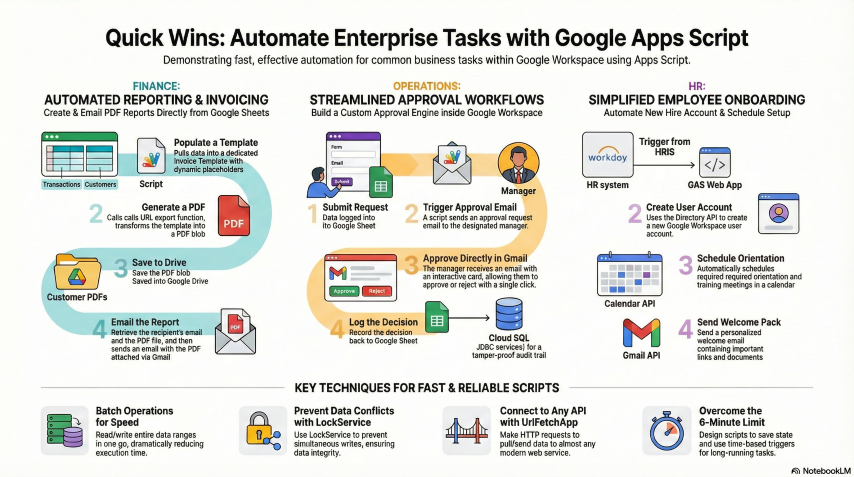
If you’re looking for a custom interface to handle reimbursements, don’t waste time spinning up AWS instances or configuring databases. You don’t need to worry about server maintenance at all. You just need Google Apps Script.
By deploying a script as a “Web App,” you can serve a custom HTML/CSS form that handles receipts, processes logic on the server side, and dumps everything straight into Google Sheets.
Why this stack wins for internal forms
Zero hosting headaches: Google hosts the code. You don’t touch servers, scaling, or uptime.
Instant “Database”: Google Sheets is your backend. Forget SQL migrations—just write the data row-by-row.
Built-in Security: You can restrict access to people in your domain. This handles authentication automatically so you don’t have to build a login system from scratch.
Rapid Deployment: You go from code to a live URL in three clicks.
The Workflow
Frontend: Use HtmlService to serve a custom form. You can even include a file upload field for receipts.
Backend: The doPost(e) function captures the incoming data.
Storage: The script appends the data to a Sheet and saves files to a specific Drive folder.
For things like expenses, approvals, or inventory, Apps Script is the sweet spot. It fills the gap between Google Forms (which is too basic) and full-scale cloud development (which is usually overkill).
Why this works so well
Here is the thing: Apps Script is the fastest way to get a functional tool off the ground without the “pro-code” baggage.
It’s serverless without the setup. Unlike traditional development where you’re stuck provisioning containers, Apps Script runs entirely on Google’s infrastructure. You deploy it, and Google gives you a URL. That’s it. You aren’t managing APIs or worrying about traffic for internal tools.
The data storage is already there. Since the script is part of Google Workspace, writing to a Sheet is native. You use the SpreadsheetApp service and you’re done. No external databases, no complex connections. For an expense form, the spreadsheet is a database that your finance team already knows how to use.
You get total control. Standard Google Forms are fine, but they’re rigid. If you need dynamic calculations, specific validation, or a branded UI, HtmlService lets you build exactly what you want using standard HTML5 and CSS.
Identity management is a non-issue. When you deploy the app, you can set it to run as the “User accessing the web app.” If you lock it to your domain, Google handles the login for you. You’ll know exactly who submitted the report without writing a single line of authentication code.
Would you like me to write a basic boilerplate script for the doPost function and the HTML form to get you started?